


Email still rules in business. Every time you hit send, people get a sense of your professionalism and how much you care about details. But let's face it: writing clean, effective emails all the time gets exhausting. It can eat up hours you'd rather spend elsewhere.
That's why AI is such a game-changer. These tools help you write smarter, shave minutes off each message, and still keep your standards high. We put this guide together using real-life advice from folks who know business communication and how AI can actually make life easier. You'll see where AI fits, how to get the most out of it, and how to come across as genuine in every note.
Why AI Makes a Difference in Email
AI isn't just a generator pumping out bland messages. The newer tools can pick up your tone, understand context, and make your emails sound like, well, you. Companies are jumping in because these tools:
- Speed up communication without dropping quality
- Give everyone a similar tone (so your brand comes through)
- Catch grammar errors, so nothing slips through
- Craft emails that feel custom (not like a robot wrote them)
- Get more replies, people actually respond and act faster
Basically, AI lets you focus on the substance, not just the formatting and phrasing.
What Counts as a Professional Email
Before you start using AI, know the basics of a solid email:
- A subject line that makes sense
- An opening that gets right to the point
- Short paragraphs, easy to follow
- Confidence and politeness in the language
- A closing that nudges action
AI can help with all of these. It's not a mind reader, but it makes your message land the way you want.
Where AI Lifts Your Email Game
Here's what AI does best:
1. Creates Content Fast
Give it a rough idea, and suddenly you've got a full, structured email.
2. Adjusts Tone
Need something formal, upbeat, or persuasive? Tell it what you want, and AI keeps the tone steady.
3. Cleans Up Grammar
It spots typos and unclear lines, making everything smoother.
4. Saves Serious Time
What used to take you 15 minutes happens in a few seconds.
How to Use AI for Email-Step by Step
Follow these steps to really get value from your AI tool:
Step 1: Nail Your Purpose
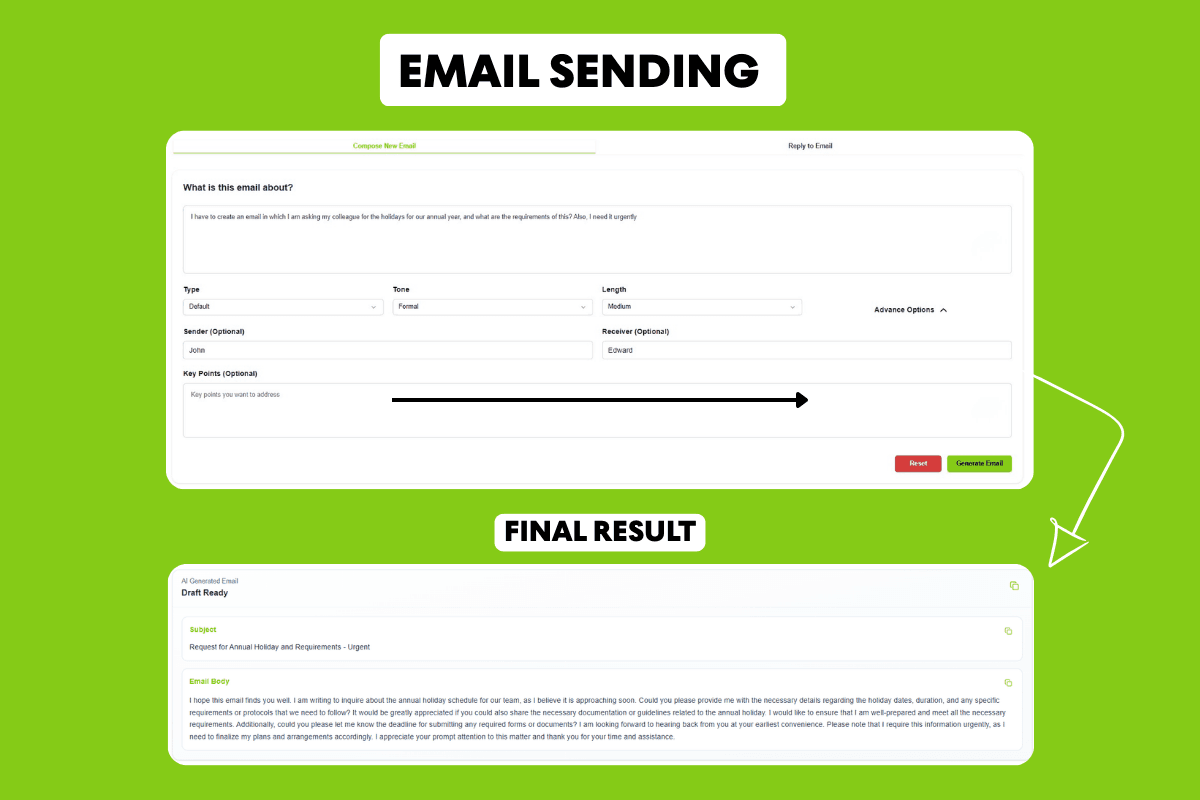
Be clear about what you want. Who's reading? What's the result you expect? Like: "Check in with a client about project approval."
Step 2: Pick a Good AI Tool
Tools like Smooli AI Email Writer come fast, keep things structured, and make it easy to tweak your draft. That means your style stays consistent.
Step 3: Make it Personal
Let AI write the basics, then add the stuff that matters: names, unique details, or a phrase that shows you're paying attention. It's what keeps emails from feeling canned.
Step 4: Keep It Tight
No rambling. Make the message clear and easy to read. AI's good at chopping out fluff.
Step 5: End With Action
Always tell the reader what to do next: "Confirm by Friday," or "Let me know when you're available."
How to Reply to Emails Using AI
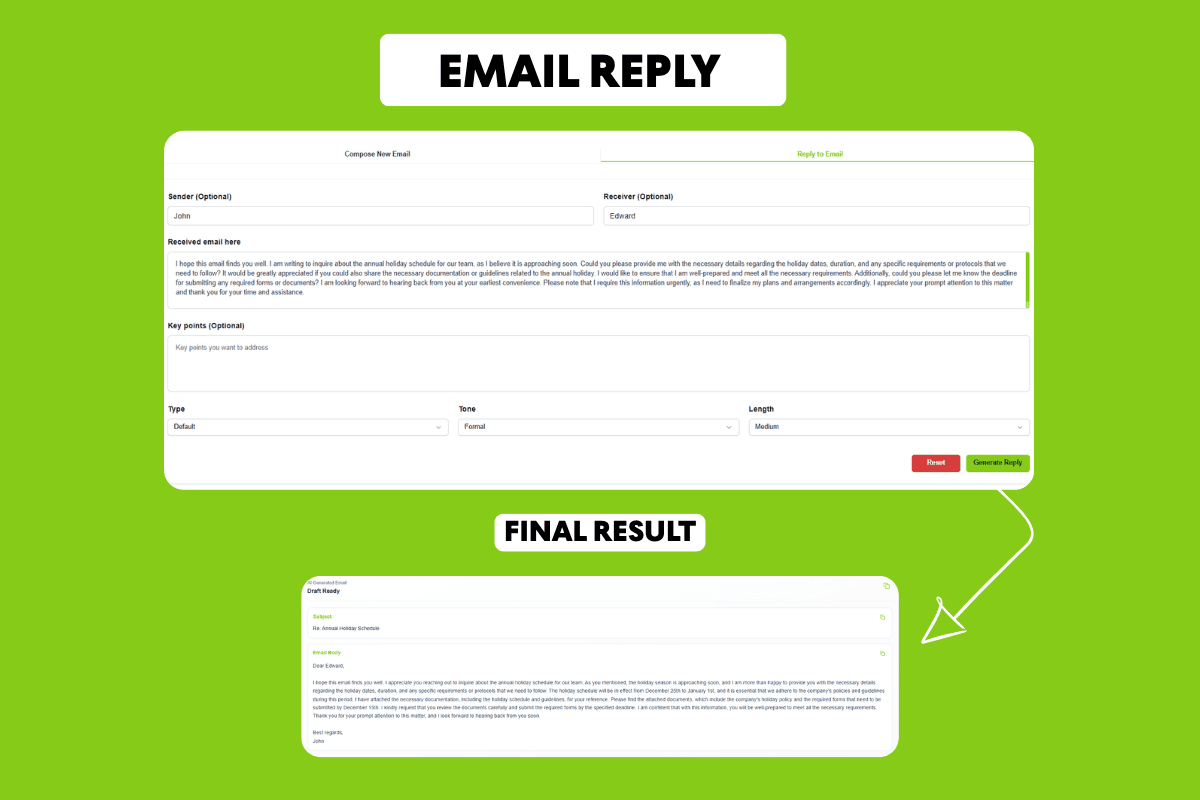
AI isn't just for new emails. Use it to help reply, too. Paste what you got, tell the tool how you want to answer ("reply formally and add requested info"), and boom-a polished response that fits. When you're dealing with messy threads or too many messages, this saves your sanity and keeps quality high.
Tips for Writing Better Emails With AI
Here's how to ramp up your results:
- Treat AI as a helper, not a substitute
- Always add your human touch
- Stay honest and clear
- Keep language direct; people trust what's simple
Avoid These Mistakes
- Don't copy and paste blindly
- Don't let your tone get stiff or cold
- Don't overload with details
- Don't forget your real audience
AI needs a good starting point and a little guidance.
How AI Drives Business Results
AI email isn't just about speed; it actually helps business:
- Gets more replies (easy to act on)
- Builds relationships (you sound competent and reliable)
- Makes teams work faster
- Keeps communication consistent, whoever's writing
Why Picking the Right AI Tool Matters
Not all AI apps deliver the same results. The best ones let you tweak, keep your voice clear, and don't mess up quality. Smooli AI, for instance, stands out for its smooth workflow and dependable output, which helps your emails sound right, every time. The tool you pick really changes how people view your work.
Where AI Email Writing Is Headed
AI is getting smarter, fast. Soon, you'll get more personal touches, real-time feedback, and integration with other business apps. Starting now sets you ahead; you'll write quicker and better than everyone else.
How to Build Trust With AI Emails
Trust is vital. Use AI to sharpen accuracy, but double-check details, use a respectful tone, and avoid exaggeration. Keep your style steady and verify facts so people know your words are reliable.
Conclusion
AI isn't just hype. Used right, it totally shifts how you handle email. Save time, communicate more clearly, get better responses, and build up those professional relationships. The sweet spot? Pair AI speed with your own smarts, and your emails won't just look good, they'll work.
Frequently Asked Questions (FAQs)
1. Can AI write all my emails?
Nope. AI's super helpful, but you need your own intent and context in there.
2. Will AI emails sound professional?
Absolutely, as long as you edit and personalize, they're solid.
3. Is AI safe for business emails?
Yes, if you handle sensitive info carefully and pick a reputable tool.
4. How much time will I actually save?
Some folks cut email writing by 70%. That's huge.
5. Are AI emails robotic?
Not if you tweak them. A little personal touch makes all the difference.
.png&w=3840&q=75)