


Cold email is difficult because the person reading your message did not ask to hear from you. They are busy, they do not know you yet, and they are deciding within seconds whether your email is useful or just another sales pitch. That is why even a well-written cold email can fail if it feels generic, too long, or disconnected from the reader's real problem.
AI can help you write cold emails faster, but it does not automatically make them better. If you give AI a weak prompt, it will usually produce a weak email that sounds polished but empty. It may use broad claims, vague benefits, and wording that feels like it could be sent to anyone. That is the exact kind of outreach people ignore.
The smarter way to use AI is to treat it as a writing assistant, not a replacement for strategy. You still need to understand who you are contacting, what they care about, and why your offer matters. AI helps you turn that thinking into clearer subject lines, stronger opening lines, shorter drafts, better follow-ups, and more natural business emails.
In this guide, you will learn how to use AI to write cold emails step by step. You will also see practical prompts, examples, editing tips, personalization methods, compliance reminders, and common mistakes to avoid. Where useful, we will also explain how Smooli AI can support the writing process without making your outreach feel automated.
What AI Should Actually Do in a Cold Email Workflow
AI is best used to speed up the writing and editing parts of cold email. It can help you move from a rough idea to a readable draft, but it should not decide your entire outreach strategy. The strategy still comes from your understanding of the market, the reader, and the offer.
A strong cold email needs a clear reason for reaching out. It should explain the problem in simple language, connect that problem to the recipient, and offer a small next step. AI can help with the wording, but you need to provide the context that makes the message relevant.
Where AI helps most
AI is especially useful when you already know what you want to say but need help saying it better. For example, you can use AI to shorten a long email, rewrite a stiff paragraph, create subject line options, adjust tone, or turn rough notes into a first draft.
Useful cold email tasks for AI include:
- Writing first drafts from rough notes
- Creating different outreach angles
- Improving clarity and tone
- Shortening long emails
- Generating subject lines
- Writing follow-up emails
- Rewriting messages for different audiences
The important point is that AI should support your judgment. If the audience is wrong or the offer is unclear, AI will only make the weak message sound more polished. That may look better on the surface, but it will not create better conversations.
Start With the Reader Before You Start With AI
Most cold emails fail because they begin with the sender. They talk about the company, the platform, the service, or the features before giving the reader a reason to care.
Better cold emails begin with the recipient's situation.
Before using AI, write a short note about the person you are contacting. Think about their role, their likely pressure points, and the business outcome they may want. You do not need deep research for every contact, but you do need enough context to avoid writing a message that sounds random.
For example, if your target reader is a freelance designer, they may care about writing faster client updates, clearer proposals, or more professional replies. If your target reader is a marketing manager, they may care about content output, email campaign quality, or saving time across repeated writing tasks.
A simple reader context formula
Before generating the email, fill in this short formula:
- The reader is: [role or business type]
- They likely care about: [problem or goal]
- My offer helps them: [clear result]
- The email should ask for: [small next step]
Here is an example:
"The reader is a small agency owner. They likely care about saving time on client emails, proposals, and follow-ups. Smooli AI helps users write and improve business content faster. The email should ask if they want to see a simple writing workflow."
This gives AI a much stronger starting point than saying, "Write a cold email for my AI tool." The more specific the input, the more useful the draft becomes.
Use Better Prompts to Get Better Cold Email Drafts
The quality of an AI-written cold email depends heavily on the prompt. A vague prompt creates a broad, generic message. A clear prompt gives AI the audience, pain point, offer, tone, length, and goal.
A good prompt does not need to be complicated. It only needs to include the right information. The goal is to guide the AI toward a short, specific, human-sounding email.
Cold email prompt you can reuse
Use this prompt as a starting point:
"Write a short cold email to [target audience]. They likely struggle with [specific problem]. My offer helps them [clear outcome]. Keep the email under 120 words. Make it sound natural, calm, and professional. Avoid hype, fake urgency, buzzwords, and pushy sales language. End with a simple question that is easy to reply to."
This prompt works because it tells AI what to write and what not to write. That second part is important. Without clear limits, AI may create an email that sounds too promotional or too long for cold outreach.
For example, if you are contacting small business owners about AI writing tools, your prompt could say:
"Write a short cold email to small business owners who spend too much time writing emails, product descriptions, and marketing content. Smooli AI helps them draft and improve business content faster. Keep it under 100 words, use simple language, and end with a soft question."
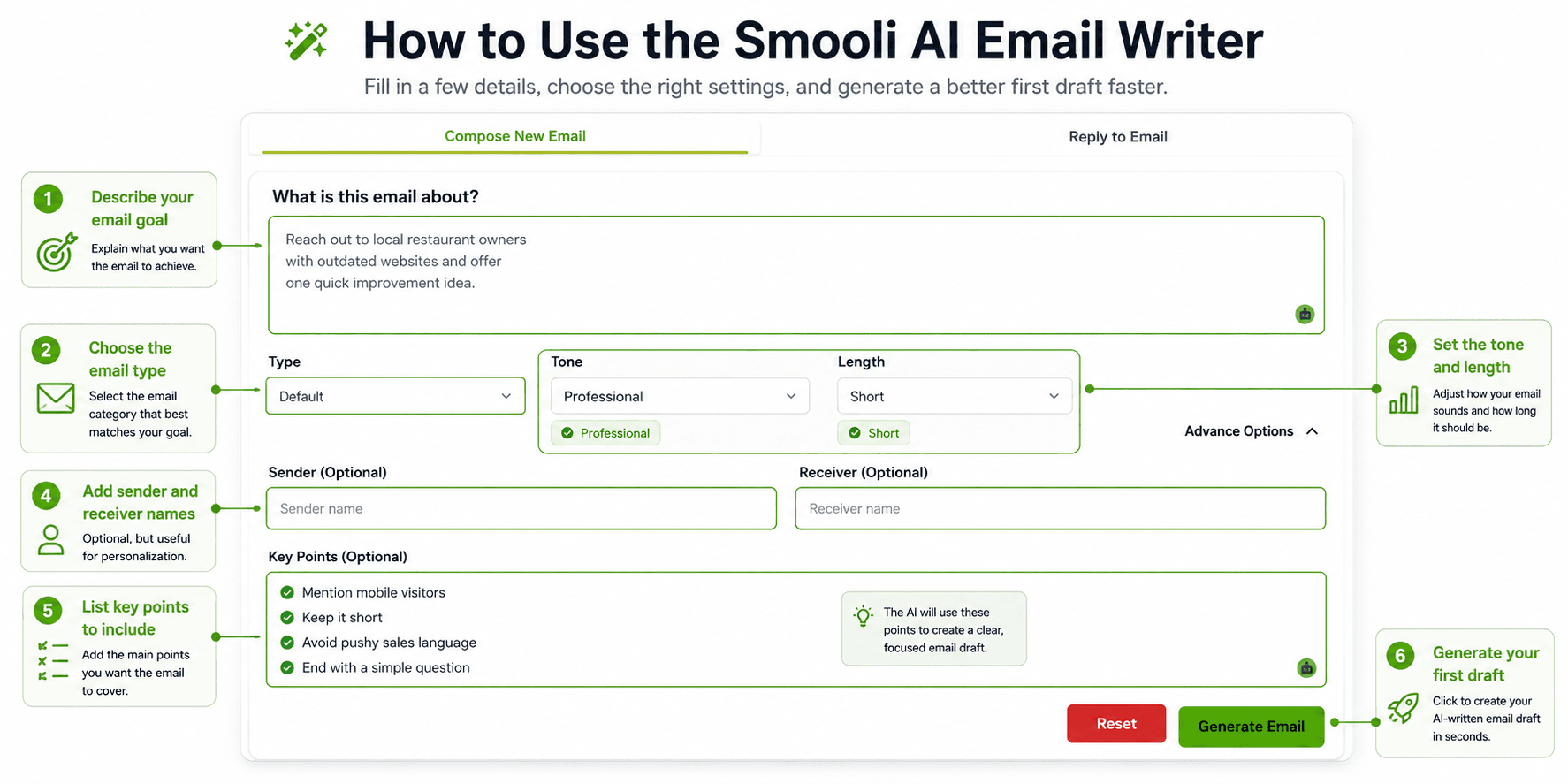
If you want a faster way to create first drafts, the Smooli AI email writer can help generate email copy based on your goal and tone. The best results still come when you add your own context before using the final draft.
Ask AI for Angles Before You Ask for the Final Email
One of the biggest mistakes beginners make is asking AI for one cold email and using the first answer. A better approach is to ask AI for different angles first. The angle is the main reason your email should matter to the reader.
Different audiences respond to different angles. A founder may care about saving time. A marketing manager may care about content quality. A freelancer may care about sounding more professional with clients. A sales team may care about faster follow-ups and clearer replies.
Example of useful cold email angles
If your offer is an AI writing tool, possible angles could include:
- Save time on repeated business emails
- Improve the quality of client communication
- Write marketing content faster
- Reduce blank-page stress
- Keep messaging consistent across a small team
Each angle can lead to a different email. This matters because the strongest cold email is not always the most detailed one. It is the one that matches what the reader already cares about.
A useful prompt would be:
"Give me five cold email angles for reaching [target audience]. My offer helps them [main benefit]. For each angle, explain the reader problem it connects to and when that angle is most useful."
Once you have the angles, choose the one that feels closest to the recipient's current need. Then ask AI to write the email around that angle.
Write Cold Emails That Sound Human, Not Overwritten
AI often writes in a polished but unnatural style. The sentences may be correct, but they can feel too formal, too broad, or too excited. Cold email needs a more natural tone because the reader is already cautious.
A human-sounding cold email is usually short, specific, and calm. It does not over-explain. It does not use big claims. It does not pretend the sender knows more than they do. It simply gives the reader a clear reason to continue the conversation.
A weak AI-style sentence
"Smooli AI is an advanced platform designed to help businesses maximize productivity and improve their communication workflows."
This sentence sounds broad and promotional. It does not clearly explain what the reader can do with the tool.
A stronger human version
"Smooli AI helps teams write, rewrite, and improve business emails faster."
The stronger version is shorter and easier to understand. It explains the practical value without sounding inflated.
For better business communication beyond cold outreach, Smooli AI's guide on how to write professional emails using AI can help users improve tone, structure, and clarity in everyday emails.
Use Personalization Carefully and Honestly
Personalization can improve a cold email, but only when it feels real. Many people overdo it by writing long compliments or using details that do not connect to the offer. That can make the email feel fake instead of thoughtful.
Good personalization is usually short. It may mention a company page, article, product update, job post, industry trend, or role-specific challenge. The goal is not to prove you researched everything about the person. The goal is to show that your email has a relevant reason to exist.
Good personalization example
"I noticed your team has been publishing more educational content around AI tools."
This is simple and useful because it connects to a possible content workflow problem.
Weak personalization example
"I was very impressed by your amazing company and everything your team is doing."
This feels empty because it could apply to anyone.
You can ask AI to improve a personalization line, but you should always provide the real detail yourself. A good prompt is:
"Add one short personalization line to this cold email using this real detail: [insert detail]. Keep it natural and avoid sounding flattering."
Mistake to avoid: never let AI invent personal details. If you do not know whether a company launched a product, hired a new team, or changed strategy, do not mention it. False personalization can damage trust quickly.
Make the Email Shorter Than Your First Draft
Most first drafts are too long. This is true for human-written emails and AI-written emails.
Cold emails should be easy to scan because the reader is not planning to study your message. They are deciding quickly whether it is relevant.
After AI creates a draft, do not send it right away. Ask it to make the email shorter, clearer, and more direct. This step often improves the message more than the first generation.
Useful editing prompts
Use prompts like these after the first draft:
- "Shorten this email by 30 percent while keeping the main meaning."
- "Remove any sentence that sounds generic."
- "Make this sound more natural and less promotional."
- "Rewrite this for a busy founder who wants the main point quickly."
- "Make the call to action softer and easier to answer."
A good cold email usually has one clear idea. If you try to include every feature, every benefit, and every proof point, the message becomes harder to read. Save the deeper explanation for the reply, landing page, or sales conversation.
Create Subject Lines That Match the Message
AI can generate subject lines quickly, but you need to guide it away from clickbait. The subject line should help the reader understand the email, not trick them into opening it.
Good cold email subject lines are usually short, plain, and connected to the message. They do not need to be clever. In many cases, simple subject lines feel more trustworthy than dramatic ones.
Subject line prompt
Use this prompt:
"Write ten short subject lines for this cold email. Keep them under five words. Make them clear and natural. Avoid clickbait, fake urgency, emojis, and misleading wording."
Examples of simple subject lines include:
- Quick question
- Content workflow idea
- Email writing help
- Idea for your team
- Possible fit?
The mistake to avoid is using dishonest subject lines such as "Re: our meeting" when there was no meeting. That may increase opens in the short term, but it damages trust and can make your outreach look deceptive.
Use AI to Write Follow-Ups That Add Value
Follow-ups are an important part of cold email, but many follow-ups are weak because they only repeat the first message. A strong follow-up gives the reader a new reason to respond.
AI can help you create follow-ups with different purposes. One follow-up can clarify the problem. Another can share a useful idea. Another can ask a simpler question. This makes the sequence feel more thoughtful and less repetitive.
Follow-up prompt
Use this prompt:
"Write three short follow-up emails based on this cold email. Each follow-up should add a different useful point. Keep each one under 80 words. Avoid guilt-based language, pressure, and repeated wording."
For example, if your first email is about using AI to write business emails faster, a follow-up could say:
"Hi [Name], one quick thought: many small teams do not need more writing tools as much as they need a faster way to turn rough notes into clear messages. Is that something your team is trying to improve?"
This follow-up works because it adds a new idea instead of saying, "Just checking in."
Check Compliance and Deliverability Before Sending at Scale
AI can help you write faster, but it cannot make poor sending practices safe. Cold email is still business communication, and you need to treat it responsibly. The rules may vary depending on where you and your recipients are located, so it is important to understand the requirements that apply to your outreach.
At a basic level, your emails should be honest, accurate, and easy to opt out of where required. Your sender details should be clear. Your subject line should match the message. If someone asks not to receive future emails, that request should be respected.
Cold email safety checklist
Before sending a campaign, check:
- Is the recipient relevant to the offer?
- Are the sender's name and email accurate?
- Does the subject line honestly reflect the message?
- Is the email clear about who is contacting them?
- Is there an opt-out method where required?
- Are unsubscribe requests handled properly?
- Is your domain set up with proper email authentication?
- Are you sending small test batches before increasing volume?
Deliverability also matters. If your domain is not set up properly or your list quality is poor, even a good email may not reach the inbox. Do not use AI to generate thousands of nearly identical emails and send them at once. That can increase complaints and hurt your sender reputation.
If cold email is part of your wider work process, it may help to organize your writing, productivity, and content tools together. Smooli AI's guide to online productivity and digital tools can help teams think through how different tools support daily work.
A Practical AI Cold Email Workflow You Can Use Today
The easiest way to start is to use a repeatable workflow. This keeps the process simple and helps you avoid relying on random AI outputs.
First, define your audience and offer in plain language. Then write one short paragraph about the reader's likely problem. After that, ask AI for several outreach angles and choose the one that best matches the recipient. Once you choose the angle, ask AI to write a short draft with a natural tone.
Next, ask AI to shorten the email and remove generic wording. Add one real personalization detail if you have it. Then generate subject lines and follow-ups. Before sending, review the final email manually for accuracy, clarity, tone, and compliance.
Beginner-friendly workflow
Use this process:
- Define the target audience.
- Clarify the problem they care about.
- Write your offer in simple language.
- Ask AI for outreach angles.
- Choose the most relevant angle.
- Generate a short email draft.
- Ask AI to shorten and simplify it.
- Add real personalization.
- Create subject line options.
- Write two or three follow-ups.
- Review manually before sending.
- Test with a small batch and improve.
This workflow keeps AI in the right role. It helps with speed and clarity, while you stay responsible for strategy and final judgment.
Smooli AI writing tools can support this workflow by helping users draft, rewrite, and improve emails, blog sections, and other business content in one place. This is useful for freelancers, marketers, founders, and small teams that want faster writing support without losing control over the final message.
Cold Email Example: Weak Draft vs Better Draft
A weak AI-generated cold email often sounds like this:
"Hi, I hope you are doing well. I wanted to reach out because we offer AI-powered tools that help businesses improve productivity, save time, and create better content. Our platform has many features that can help your team work smarter. Would you like to schedule a call?"
The grammar is fine, but the email is not strong. It does not explain who the message is for, what specific problem it solves, or why the reader should care. It also asks for a call before giving enough value.
A better version would be:
"Hi [Name], I noticed your team publishes regular content, and keeping quality high while moving quickly can be difficult. Smooli AI helps teams draft, rewrite, and improve business content faster, including emails, blog sections, and everyday marketing copy. Would it be useful if I shared a simple workflow your team could test?"
The second version is stronger because it connects to a specific situation, explains the benefit clearly, and asks for a small next step. It still needs real personalization before sending, but the structure is much better.
Common Mistakes When Using AI for Cold Emails
AI can improve cold email writing, but it can also make weak outreach easier to scale. The goal is not to produce more emails. The goal is to produce better, more relevant emails.
Mistake 1: Sending the first AI draft
The first AI draft is usually a starting point, not the final version. Always shorten, simplify, and review it before sending.
Mistake 2: Using fake personalization
Do not let AI invent details about the recipient or company. Use only information you can verify.
Mistake 3: Making the email too long
A cold email should create interest, not explain everything. If the email has too many ideas, the reader may ignore all of them.
Mistake 4: Sounding too promotional
Avoid broad claims and inflated language. Clear, specific writing builds more trust.
Mistake 5: Ignoring deliverability
A good email still needs a healthy sending setup, a relevant list, and responsible volume.
How This Guide Was Prepared
This guide was created by the Smooli AI editorial team to help readers use AI writing tools practically and responsibly. It focuses on cold email strategy, AI-assisted writing workflows, personalization, tone improvement, follow-ups, and common outreach mistakes.
The purpose is not to encourage spam or mass messaging. The purpose is to help readers write clearer emails that respect the recipient's time and make the next step easier to understand. AI can speed up writing, but the sender still needs to make thoughtful decisions about the audience, message, accuracy, and compliance.
Smooli AI is included where it naturally supports the workflow: generating first drafts, improving tone, rewriting unclear sentences, and helping users produce business content faster. The final email should always be reviewed by a person before it is sent.
Use AI to Improve the Message, Not Replace the Thinking
AI can make cold email writing faster, but the best cold emails still come from clear thinking. The reader should understand why you reached out, what problem you are pointing to, and what simple next step you are suggesting.
Start with one audience and one offer. Use AI to explore angles, write a short draft, improve the tone, create subject lines, and prepare follow-ups. Then review everything yourself. Remove vague claims, verify every detail, and keep the email shorter than your first draft.
That is how AI becomes useful for cold email. It helps you express a relevant message more clearly, but it does not replace strategy, empathy, or good judgment.
FAQs
Can AI write cold emails for me?
Yes, AI can write cold email drafts, subject lines, follow-ups, and message variations. The best results come when you give it clear information about the audience, offer, pain point, tone, and goal. You should still review and edit the final email before sending.
How do I make AI cold emails sound human?
Give AI real context, ask for simple language, and remove wording that sounds too promotional. Add one accurate personalization detail when possible. The final email should sound like a helpful person wrote it, not like a mass campaign.
What is the best prompt for writing cold emails with AI?
A strong prompt includes the target audience, problem, offer, tone, length, and call to action. It should also tell AI what to avoid, such as fake urgency, exaggerated claims, and pushy language.
Should I use AI for cold email personalization?
Yes, but carefully. AI can help turn real research into a natural sentence, but it should not invent details. Always provide the personalization information yourself and check it before sending.
How long should a cold email be?
Most cold emails should be short, usually around 60 to 120 words. The goal is to earn interest and start a conversation, not to explain your full product or service.
Can AI help write cold email follow-ups?
Yes, AI can help write follow-ups that add new points, ask simpler questions, or test different angles. The best follow-ups do not repeat the first email. They give the reader a fresh reason to respond.
Is it safe to send AI-written cold emails at scale?
AI-written emails still require responsible sending practices. You should follow applicable email laws, use honest sender information, include opt-out options where required, protect your domain reputation, and avoid sending large volumes of generic emails to poor-quality lists.
.png&w=3840&q=75)